
pin this idea ↓

Verity JE
Mobile gaming has quietly changed shape. Players no longer treat a game as a fixed product; they treat it as a foundation they can extend, restyle and personalise with community made content, and Minecraft is the clearest example of that shift anywhere in gaming.
Within that culture sits Verity JE, a small Android experience from L13 Dev Studio: a companion to the wider world of Minecraft modification, built for players who want expanded possibilities on the phone already in their pocket, without a desktop setup or a complicated toolchain.
This page is the complete orientation. It explains what Verity JE is, how it connects to the Minecraft ecosystem and Java Edition modding, what the setup involves on Android 8.0 and above, and what to check before you download anything.
Everything here is written against the current build, version v1.4, tested on real devices, so the details match the app you will actually open.
On this canvas
Sketchboard screenshots
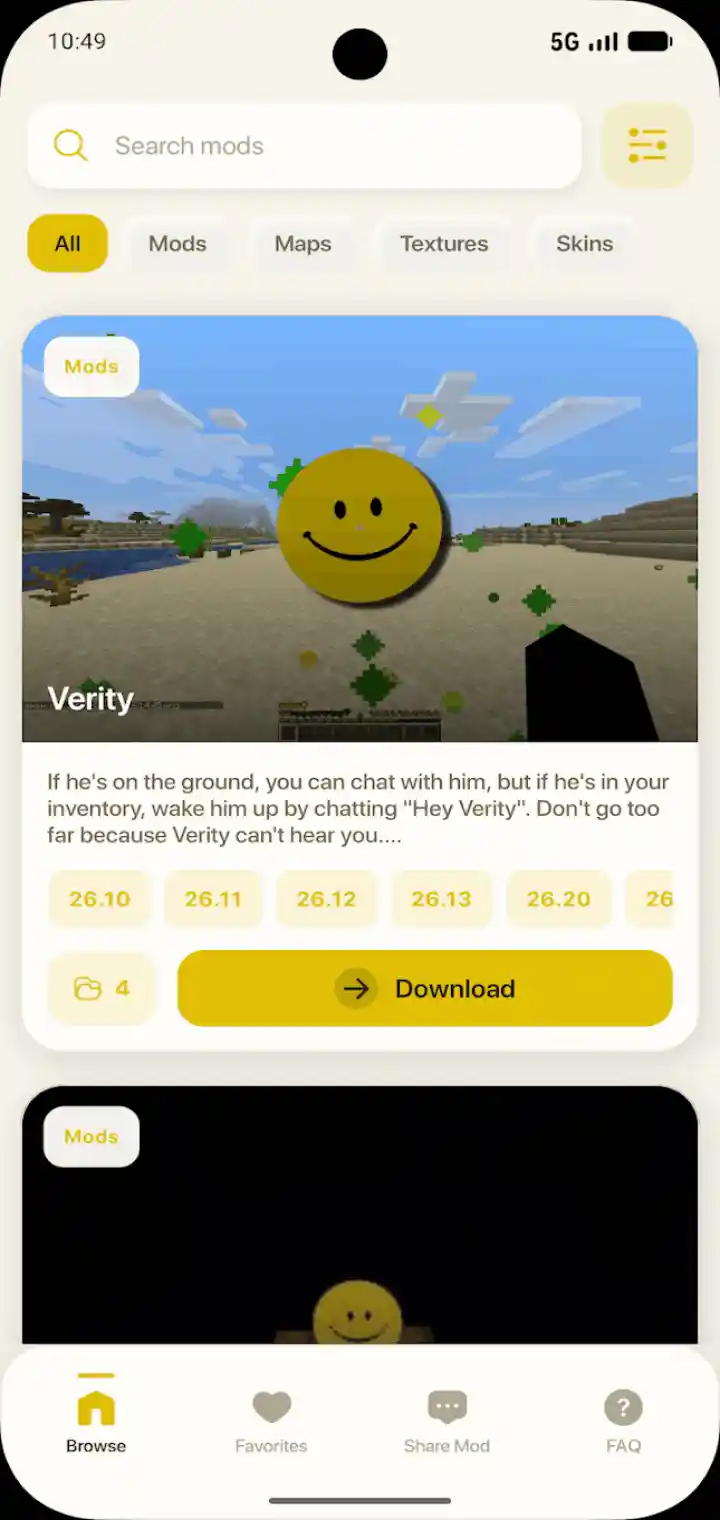
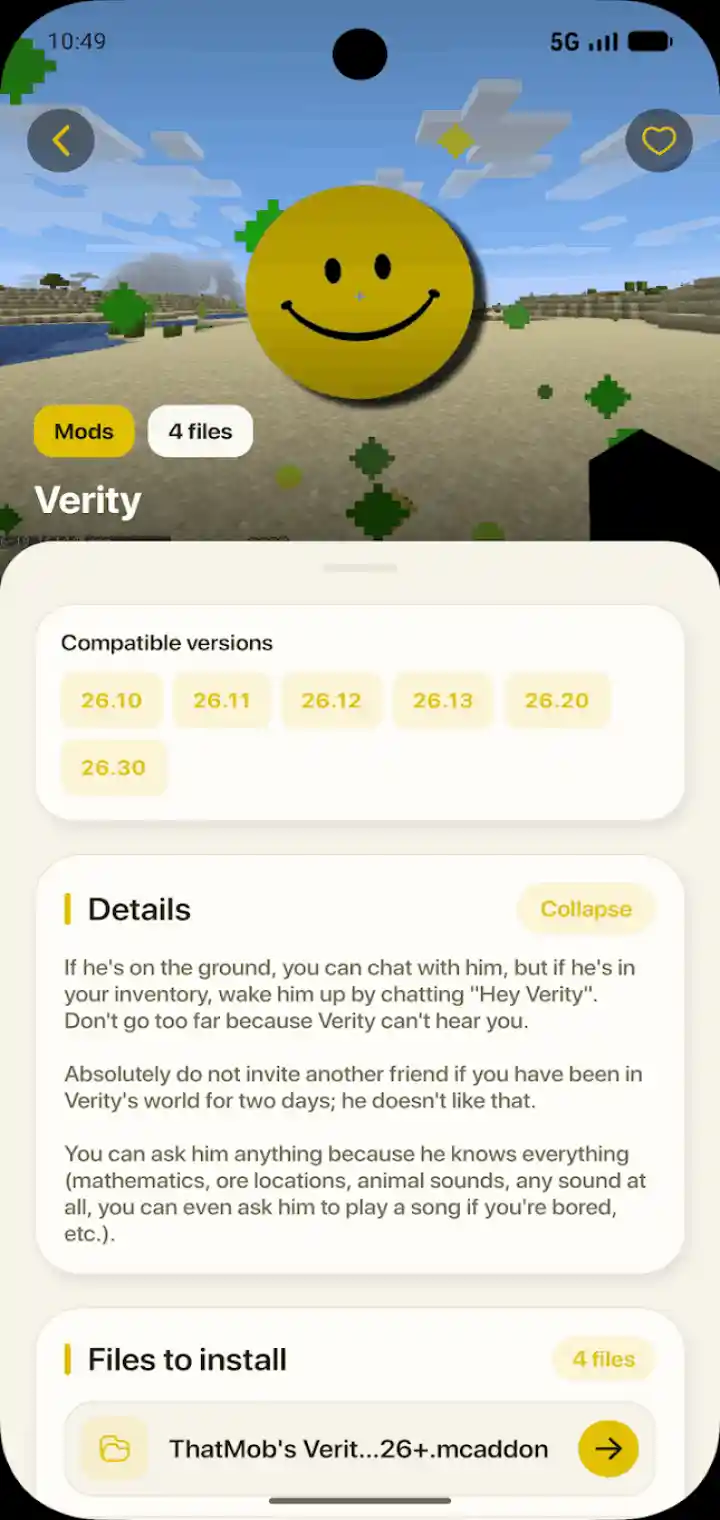
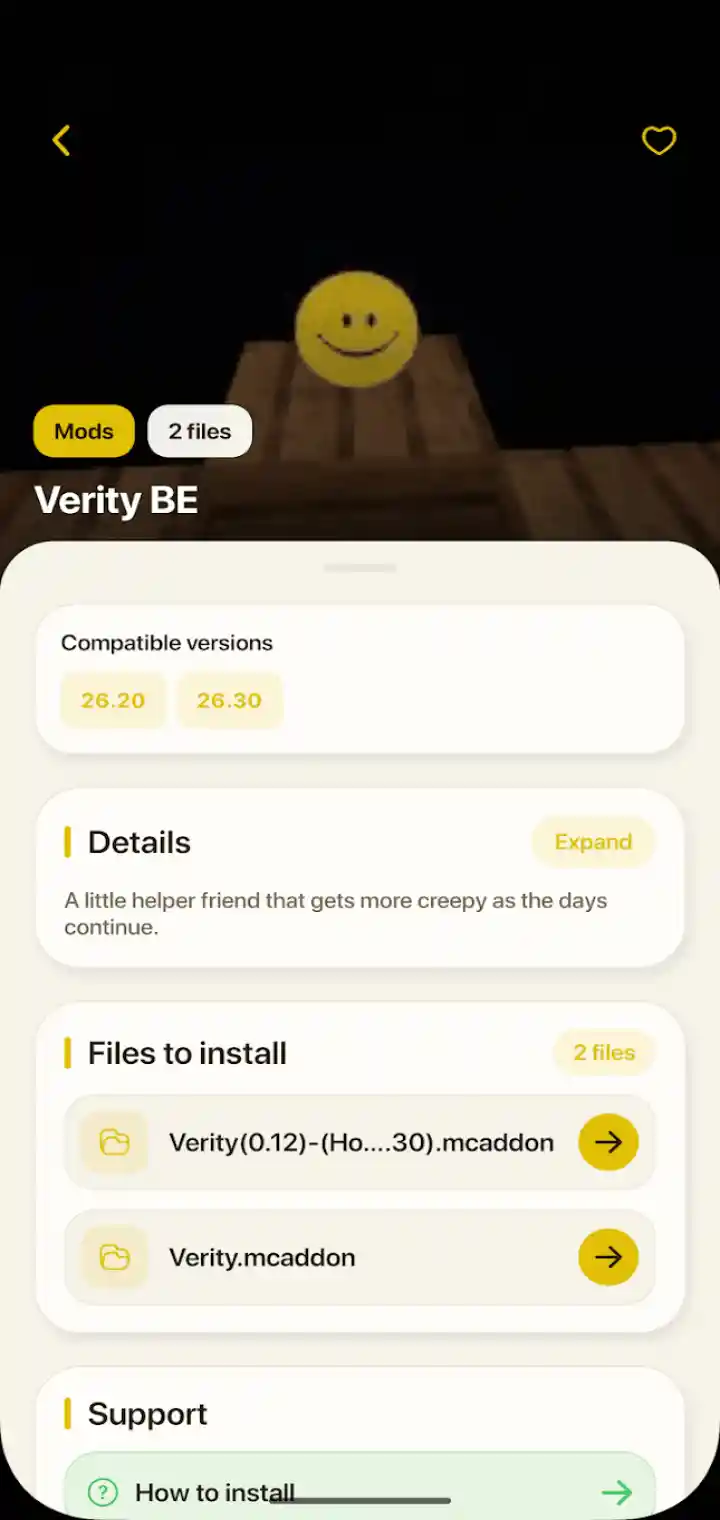
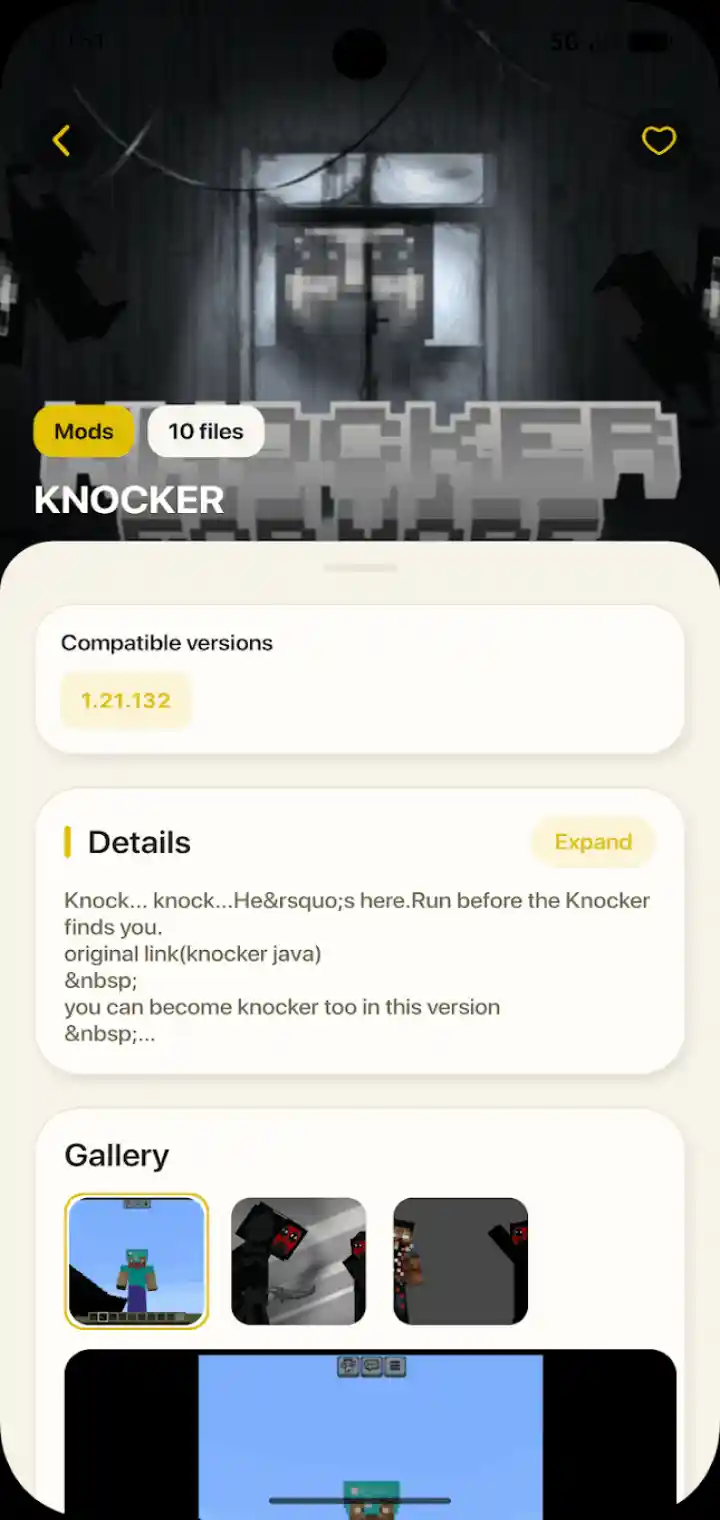
What Is Verity JE?
In plain terms, Verity JE is an Android experience built around Minecraft related customisation: extra content, modpack thinking and community style expansion, packaged for mobile players who want more than the standard setup offers.
The term represents an ecosystem where users interact with additional gameplay elements beyond the standard Minecraft environment.
Additional experiences such as modification systems and modpacks expand this foundation.
The relationship becomes: Minecraft Foundation → Verity JE Experience → Additional Possibilities → Player Interaction
Understanding Verity JE requires looking beyond a simple application or modification.
Minecraft itself provides a foundation based on:
- Building
- Exploration
- Creativity
- Survival
- Resource management
What Verity JE connects
It represents a connection between:
- Game environment
- Custom content
- User experience
- Community development
Verity JE And Minecraft Ecosystem
Minecraft works as an ecosystem rather than a single game: a core sandbox, official updates, and a huge ring of community creation around it, and this app belongs to that outer ring.
Modification-based experiences create alternative ways to interact with Minecraft.
Minecraft Core + Community Innovation + User Creativity
Verity JE belongs to this larger environment where users explore expanded gameplay possibilities.
Original Minecraft Gameplay
The original experience focuses on:
- Exploration
- Crafting
- Building
- Survival
- Creativity
Community Content
The Minecraft community creates:
- Mods
- Modpacks
- Custom worlds
- Additional experiences
Modified Experiences
The ecosystem includes original gameplay, community content, and modified experiences that expand how players interact with Minecraft.
Verity JE Minecraft Java Edition Relationship
Java Edition is where Minecraft modding grew up, and its culture of loaders, modpacks and community standards shapes how experiences like this one are designed and discussed.
Minecraft Java Edition has historically been one of the most important environments for modification communities.
The relationship can be understood as: Minecraft Java Edition + Modification Ecosystem + Custom Content
This environment allows creators and users to explore experiences beyond the standard game structure.
The Java ecosystem is known for:
- Extensive customization
- Community development
- Modification support
- Flexible gameplay experiences
Verity JE Features Overview
The feature set is best understood as layers: content that extends the base experience, customisation that lets players make it theirs, and a structure that keeps the additions organised rather than chaotic.
Minecraft-Based Experience
Verity JE connects with Minecraft-related gameplay concepts.
This creates familiarity for users who already understand the Minecraft environment.
Custom Gameplay Possibilities
Additional systems can create new ways for players to interact with the game.
These possibilities may influence:
- Exploration
- Creativity
- Strategy
- Player decisions
Community-Driven Experience
Minecraft experiences often grow through community participation.
Community involvement creates:
- Shared knowledge
- Creative ideas
- User feedback
Verity JE Gameplay Experience
In play, the experience is about possibility rather than a fixed path: you explore, build and experiment with additional elements woven into the familiar Minecraft rhythm of gathering, crafting and creating.
The structure is: Player Action → System Response → New Experience
A customized Minecraft experience can influence:
The value of Verity JE comes from creating additional possibilities within the Minecraft environment.
- How players explore
- How players build
- How players solve challenges
- How players interact with the environment
Verity JE And Player Creativity
Creativity is the engine of the whole model. The app supplies material and possibility; the player supplies the ideas, which is why two users can have genuinely different experiences from the same install.
A customized experience can expand creative possibilities.
Creative Freedom + Additional Systems + Player Imagination
Verity JE fits within this broader concept of allowing users to experience Minecraft through different perspectives.
Players use Minecraft to create:
- Buildings
- Worlds
- Stories
- Personal challenges
Verity JE And Custom Content
Custom content is how the experience stays alive: new elements, community ideas and personal configurations that refresh a game players may have owned for years.
Instead of only consuming official content, users can experience content created through communities and developers.
Creator Innovation + Platform Support + User Interaction
Custom content may include:
- Gameplay adjustments
- New systems
- Modified environments
- Additional interactions
Verity JE User Experience Model
The user experience is designed around short mobile sessions as much as long ones: quick to open, readable on a phone screen, and forgiving of the interruptions that real life schedules around gaming.
Discovery - Users learn what Verity JE represents.
Understanding - Users understand its relationship with Minecraft.
Exploration - Users explore available possibilities.
Interaction - Users create their own gameplay experience.
Information → Understanding → Usage → Experience
Verity JE Target Users
The natural audience is Minecraft players who already enjoy experimenting: modpack users, creative builders, and mobile players curious about what the wider modification world adds to the base game.
Minecraft Players
Users already familiar with Minecraft may explore additional experiences.
Creative Users
Players interested in experimentation and customization may find value in expanded systems.
Modding Enthusiasts
Users interested in Minecraft modification ecosystems may explore related experiences.
Mobile Gaming Users
Users interested in accessing gaming experiences through mobile platforms may seek convenient solutions.
Verity JE Overall Concept
Stepping back, the concept is a bridge: between the standard mobile game and the richer modification culture that grew up around Java Edition, carried onto Android in a form a phone can handle.
Minecraft Environment → Player Interaction → Personalized Gameplay
The importance of Verity JE comes from how it connects users with a broader Minecraft ecosystem.
Verity JE Installation And Setup Understanding
Installing Verity JE on Android follows the familiar manual route: download the package, allow the install for that source in settings, open the app, then turn the permission back off. The steps below match the current v1.4 build exactly.
For Minecraft-related experiences, installation is not only about placing files or opening an application. It is a process where multiple systems communicate together.
Platform Environment + Required Components + Correct Configuration = Functional Experience
A properly prepared environment creates a smoother experience and reduces possible technical problems.
Verity JE users need to understand the relationship between:
- Minecraft environment
- Supported systems
- Required files
- Device capability
- User configuration
Verity JE Setup Process
Setup after installation is mostly preparation: a compatible environment, enough free storage, and a few minutes of patience while the app organises itself on first launch.
Understanding The Environment
Before using any Minecraft-related experience, users should understand the environment where it operates.
Important areas include:
- Supported platform
- Game version
- Required components
- Available resources
Preparing Required Elements
Preparation creates the foundation for successful usage.
This may involve:
- Organizing required files
- Checking compatibility
- Preparing the gaming environment
Connecting Systems
The final setup stage connects different elements together.
The relationship becomes: Minecraft Environment + Verity JE Components + User Configuration
When these elements work together, users can access the intended experience.
Verity JE And Minecraft Modpack Relationship
Modpacks are bundles of content designed to work together, and the thinking behind them, curation over chaos, is the same thinking that makes an experience like this one coherent instead of a pile of extras.
A modpack is a collection of multiple modifications and supporting elements combined into one experience.
The structure is: Multiple Mods + Configuration + Shared Environment = Modpack Experience
Modpacks allow creators to design complete gameplay experiences instead of focusing on a single modification.
Verity JE connects with this concept because modern Minecraft experiences often involve combinations of custom systems, gameplay changes, and community-created content.
- Custom systems
- Gameplay changes
- Community-created content
Verity JE Gameplay Expansion
Expansion only matters if it integrates. The additions here are meant to sit inside the normal flow of play, surfacing as new options in familiar situations rather than a separate mode bolted on the side.
A standard Minecraft environment provides a strong foundation, but customized experiences can introduce different ways of interacting with the game.
Minecraft Foundation + Expanded Systems = New Gameplay Possibilities
Gameplay expansion may influence:
- Exploration methods
- Player strategies
- Creative decisions
- Overall interaction
Verity JE And Community Content
Community content is both the history and the future of this corner of gaming: players build for players, and the experiences that survive are the ones a community keeps choosing to use.
The community relationship is: Creators + Players + Shared Experience = Growing Ecosystem
Verity JE exists within this broader environment where community-driven development plays an important role.
Players and creators contribute through:
- New ideas
- Custom experiences
- Technical improvements
- Shared knowledge
Verity JE Compatibility Considerations
Compatibility is the unglamorous foundation: Android 8.0 and above, the correct package identity (com.l13devstudio.verit), and a device with enough storage and memory for the app to work as intended.
Compatible Components + Correct Environment = Stable Experience
Platform Compatibility
The environment must support the experience.
Version Compatibility
Different versions may have different requirements.
Component Compatibility
Supporting elements need to communicate correctly.
Verity JE Performance Factors
Performance on a phone is decided by the usual physics: processor headroom, free memory, storage speed and heat. The app runs best when the device is not simultaneously full, hot and busy.
Hardware Capability + Experience Requirements = Performance Quality
Users should maintain balance between available features and system capability.
Important performance factors include:
- Device capability
- System complexity
- Configuration choices
- Available resources
Verity JE User Experience Improvement
Small habits improve the experience more than any setting: keep storage headroom, close heavy background apps before a session, and keep the app updated, because fixes and polish arrive in the updates.
Knowledge + Practice + Adaptation = Better Experience
Learning The System
Understanding how the experience works creates better interaction.
Managing Configuration
Proper settings help balance performance and functionality.
Exploring Gradually
Learning features step by step creates stronger understanding.
Verity JE Common Considerations
Before any download, the sensible checks apply: a trusted source, the real package name, and a minute spent reading what the app is and is not, which prevents nearly every disappointment players report.
System Requirements
The environment should support the required processes.
Compatibility
Different components should work together.
Usage Purpose
Users should understand what type of experience they want.
Management
A clean and organized setup helps maintain stability.
Verity JE Long-Term Experience
Long term, the value of an expandable experience is that it grows with the player. As your Minecraft tastes change, the same install keeps offering new combinations to try.
Stable Environment + User Engagement + Continuous Development
Long-term value comes from:
- Continued exploration
- Community involvement
- System improvements
- User adaptation
How To Download Verity JE
Downloading is a short, deliberate process: use the download page on this site, wait for the brief preparation timer, and choose the file that matches what you need, the v1.4 APK package at 67.94 MB or the Beta ZIP. Then verify the package name, com.l13devstudio.verit, before you install anything.
After obtaining Verity JE, users can continue with the installation steps and prepare the required settings for a smoother experience.
How To Use Verity JE
Once installed, open the app, let it finish its first run setup on a stable connection, and explore at your own pace. Most players get the best start by trying one new element at a time, so cause and effect stays readable while they learn what the experience adds.
Using Verity JE effectively depends on understanding available features, maintaining proper settings, and creating a setup that matches the user’s preferred gameplay experience.
Verity JE Benefits
The benefits stack up quietly: a richer Minecraft related experience on mobile, customisation without a desktop toolchain, and an entry point into modpack culture that respects how people actually use their phones.
Main benefits include:
- More gameplay possibilities
- Additional customization options
- A different way to experience Minecraft
- More opportunities for exploration and creativity
Frequently asked questions
What Is Verity JE?
Verity JE is an Android experience from L13 Dev Studio connected with Minecraft related customisation, expanded content and modpack style play, currently at version v1.4 for Android 8.0 and above.
Is Verity JE Connected With Minecraft?
Yes. It is designed around the Minecraft ecosystem and the custom content culture that surrounds the game, especially the modification ideas that grew up around Java Edition.
What Makes Minecraft Java Edition Important For Mods?
Java Edition built the world's largest modding culture: loaders, modpacks and community standards. That culture defines what players expect from custom content everywhere, including mobile experiences like this one.
Does Verity JE Provide A Different Minecraft Experience?
It offers a different emphasis rather than a different game: extra content and customisation layered over familiar Minecraft ideas, so sessions feel expanded instead of replaced.
Why Are Modpacks Important In Minecraft?
Modpacks bundle compatible content into one curated set, which keeps additions working together. That curation is what separates a coherent expanded experience from a folder of random extras.
Is Compatibility Important For Verity JE?
Compatibility decides whether everything works together: the right Android version, the genuine package and enough device headroom. Checking it first prevents most setup problems players ever meet.
Conclusion
The picture that emerges is simple: a small Android app carrying a big idea, that a game can keep growing after release when a community is invited to build on it.
Approach Verity JE with the basics right, a trusted download, the correct package identity, a compatible device, and the experience delivers what it promises: more ways to enjoy the Minecraft world from your phone.
Start with the download page, follow the install steps in order, and explore one addition at a time.
Minecraft provides the foundation; experiences like this one, plus your own creativity, decide how far it goes.
Download Verity JE